Кіраванне файламі cookie, якія выкарыстоўваюцца для рэкламы, такіх як персаналізацыя рэкламы, рэмаркетынг і аналіз эфектыўнасці рэкламы.
4.3.3.6. Delete old emails using Thunderbird
Attention!
Information in this article is provided for guidance only and does not represent precise instructions.Quite often, old messages that are no longer relevant and no longer needed can be stored in email, but still take up space. From time to time you need to delete them, and this process can be automated. In Thunderbird, you can use filters to configure automatic message deletion.
- Sign in to Thunderbird, click mailbox name, and go to the "Message filters" menu:

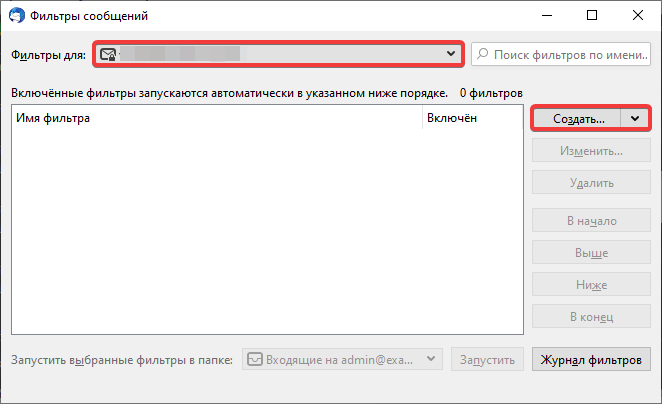
- Select required mailbox and click "Create":
- Configure filter:
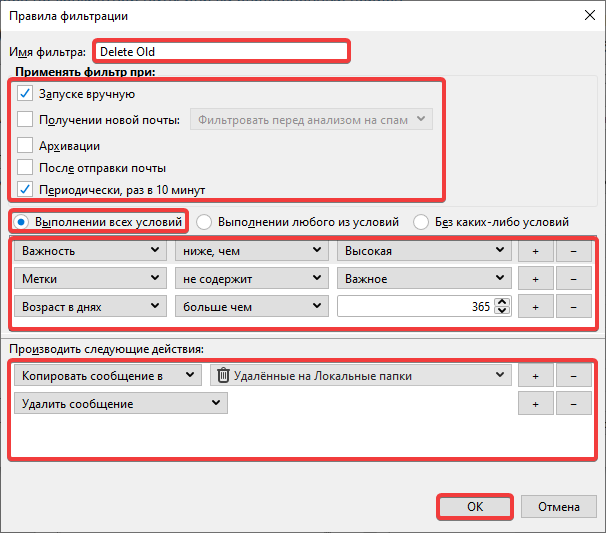
- Enter custom name for the filter.
- Select required items for filter launch methods. To automate old email deletion, specify "Periodically, every 10 minutes".
- Select "Fulfillment of all conditions".
- Specify required filter action trigger conditions. To avoid deleting important emails, add conditions that ignore emails with high priority or required labels. You can add new conditions by clicking +. We recommend setting the following conditions:
Condition Parameter Value Description Importance lower than High Filter will be applied only to those emails for which "Importance" value is normal or lower. Labels does not contain Important Filter will not be applied to emails with "Important" label. You can add many similar conditions to keep emails with other labels. Age in days greater than 365 Filter is applied only to emails older than 365 days. You can specify any value. - Specify required actions when performing filter:
Action Parameter Description Copy message to Remote to local folders This action is required only if emails must be saved. Target directory for saving can be different. Delete message — Action for deleting email. Place this action last in action list.
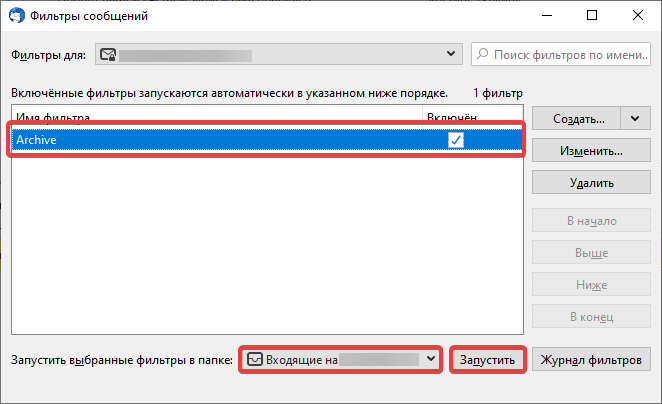
- Save the filter by clicking "OK" and check its operation. For testing, you can run it manually in the filter window by selecting the required filter and target directory: