Кіраванне файламі cookie, якія выкарыстоўваюцца для рэкламы, такіх як персаналізацыя рэкламы, рэмаркетынг і аналіз эфектыўнасці рэкламы.
2.4.1.2.8. Pages protection
Important points:
- Protection does not apply to requests from IP addresses on the Firewall whitelist.
- Protection does not work for static files, clean URLs, and addresses with GET parameters.
- Protection cannot be set for the site's main page.
- When protection is not passed, the visitor gets a 429 response.
- The language of the protection page can be changed in the site settings.
Page protection allows you to increase the security of your site — protect the registration page from automatic registrations, protect the site's admin panel from automatic password selection systems, and reduce the load created by bots when attacking the site. Examples of pages for which it is recommended to install such protection: for WordPress — /wp-login.php and /xmlrpc.php (however, it is not recommended to install it for /wp-admin/), for Joomla! — /administrator/, etc.
Configure
Configuring is performed in the "Site protection" section on the "Page protection" tab using the "Set protection" button: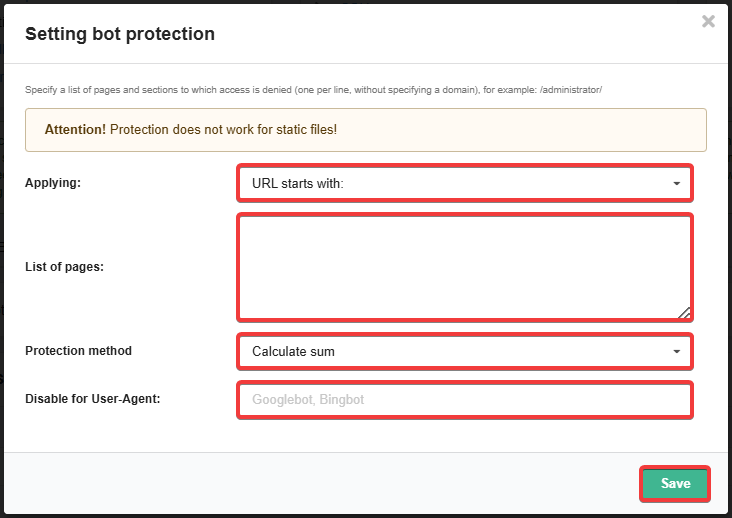
- Applying — which part of the URL will be searched for the specified pages:
- URL starts with — at beginning of URL.
- URL ends with — at end of URL.
- URL contains — in any part of URL.
- List of pages — pages to be searched in the selected part of URL:
- Each page from a new line.
- Domain does not need to be specified.
- Page addresses must begin with
/and point to real files and directories.
- Protection method — protection method that will be used when the site page is opened:
- Calculate sum — visitor needs to solve a simple math task.
- Captcha — visitor needs to enter digits from image.
- Check JavaScript — in a visitor's browser, a calculation of a simple math task is performed invisibly using JavaScript (if JavaScript is disabled, the visitor will see an access error and a message to enable JavaScript).
- Disable for User-Agent (optional) — comma separated list of User-Agent for which protection will not apply.
Changes are applied within 10 minutes.
Statistics
At the top of the "Page protection" tab, statistics for the last 3 days are displayed. The chart shows how many successful visits to protected pages there were and how many requests were blocked because the protection was not passed.