Кіраванне файламі cookie, якія выкарыстоўваюцца для рэкламы, такіх як персаналізацыя рэкламы, рэмаркетынг і аналіз эфектыўнасці рэкламы.
2.5.2.7. Temporary FTP access to specific directory
Attention!
Restricting access in this way is not secure. If the directory that is accessible via FTP is also accessible via HTTP, a script can be uploaded to it via FTP and executed via HTTP — in this case, the FTP root directory restriction will not apply. This option should only be used for convenience. Complete isolation can only be achieved by placing the site on a separate hosting account.Sometimes it may be necessary to provide a third party (e.g., a site developer or third-party specialist) with temporary access not to the entire contents of the hosting account, but only to a specific directory (e.g., the directory of a specific site or subdomain, without access to neighboring sites on the hosting account).
Grant access
- Create a new FTP user and specify the path to the required directory in its additional settings:
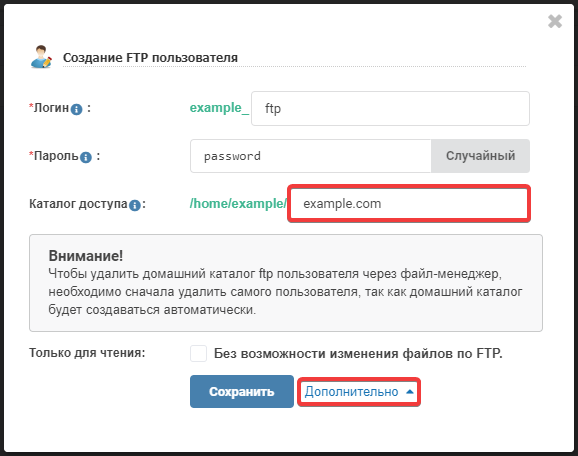
- To access the main domain and subdomain directories, specify only the site name (for example,
example.com). - To access only the main domain directory, specify the site name and the subdirectory
wwwseparated by a slash (for example,example.com/www). - To access only the directory of a specific subdomain, specify the site name followed by a slash and the subdomain name (for example,
example.com/sub).
- Connection data for this FTP user (host, login, and password) should be provided to the person for whom the access was created.
- If FTP access restriction is enabled, add the IP of the person being granted access to the allowed list.
Having the connection data, a third party will be able to connect via FTP using any FTP client, such as FileZilla, WinSCP, or Total Commander.
Revoke access
- If FTP access restriction is enabled, remove the IP of the person who was granted access from the allowed list. If access restriction is disabled, it is recommended to enable it.
(2)