Кіраванне файламі cookie, якія выкарыстоўваюцца для рэкламы, такіх як персаналізацыя рэкламы, рэмаркетынг і аналіз эфектыўнасці рэкламы.
2.2.6. Change country of hosting account
Important points:
- Perform migration during times of lowest site traffic.
- Migration may be temporarily unavailable when ordering or switching to business hosting.
- Migration is not available for hosting accounts with ordered dedicated IPs. To migrate, you need to switch to a shared IP in the settings of all sites in the hosting account and disable all ordered dedicated IPs.
- During migration:
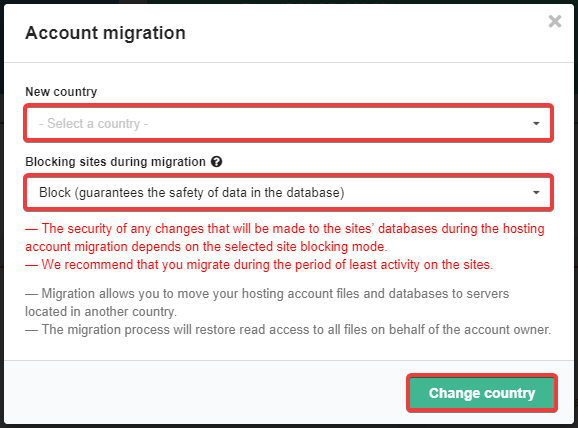
- Site availability depends on the selected mode of blocking sites during migration.
- All files in the hosting account will have read access restored on behalf of the owner of that hosting account.
- You cannot order or delete extra services.
- After migration, when connecting via SSH, you may encounter the errors "REMOTE HOST IDENTIFICATION HAS CHANGED" and " POSSIBLE DNS SPOOFING" errors may occur when connecting via SSH. Use the appropriate instructions to resolve them.
Available countries
Shared hosting:
- 🇺🇦 Ukraine
- 🇩🇪 Germany
- 🇺🇸 USA
- 🇫🇷 France
- 🇵🇱 Poland
- 🇨🇦 Canada
- 🇸🇬 Singapore
- 🇫🇮 Finland
- 🇦🇺 cAustralia
Business hosting:
- 🇺🇦 Ukraine
- 🇩🇪 Germany
- 🇺🇸 USA
Migration
- Open the "Hosting" section.
- In the "Location" section, click "Change":
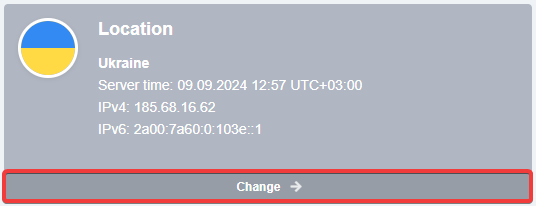
- Select a new country, mode for blocking sites during migration and click "Change country":
- Please wait from a few minutes to a few hours (depending on the size of your hosting account and the queue of transfer requests). Once complete, a notification will be sent to your email.
(5)